1. Click Add and select Generic Backup.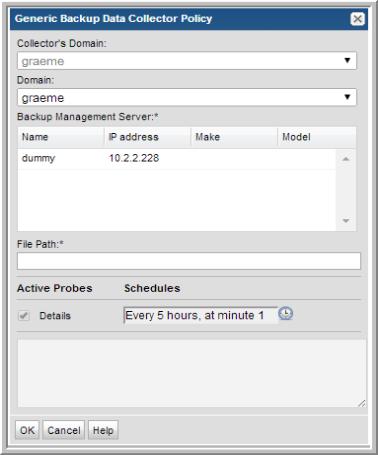
Field | Description | Sample Value |
Domain | The domain identifies the top level of your host group hierarchy. The name was supplied during the installation process. All newly discovered hosts are added to the root host group associated with this domain. If you are a Managed Services Provider, each of your customers will have a unique domain with its own host group hierarchy. To find your Domain name select Admin > Servers and Domains > Domains. | yourdomain |
Backup Management Server* | Select the backup product management server e.g., Generic Backup Server) with which the Data Collector will communicate. The selected management server is used to associate the data file with a server. | |
File Path* | The absolute file path on the Data Collector Server where the CSV data file is located. Typically, C:\\Program Files\\Aptare\\mbs\\logs\\genericBackups.csv for Windows, or /opt/aptare/mbs/logs/genericBackups.csv for Linux. | /opt/aptare/mbs/logs/genericBackups.csv |
Details | Check the box to activate details collection. Click the clock icon to create a schedule frequency. You can schedule the collection frequency by minute, hour, day, week and month. Relative schedules are relative to when the Data Collector is restarted. Advanced use of native CRON strings is also available. | CRON example: */30 * * * * |